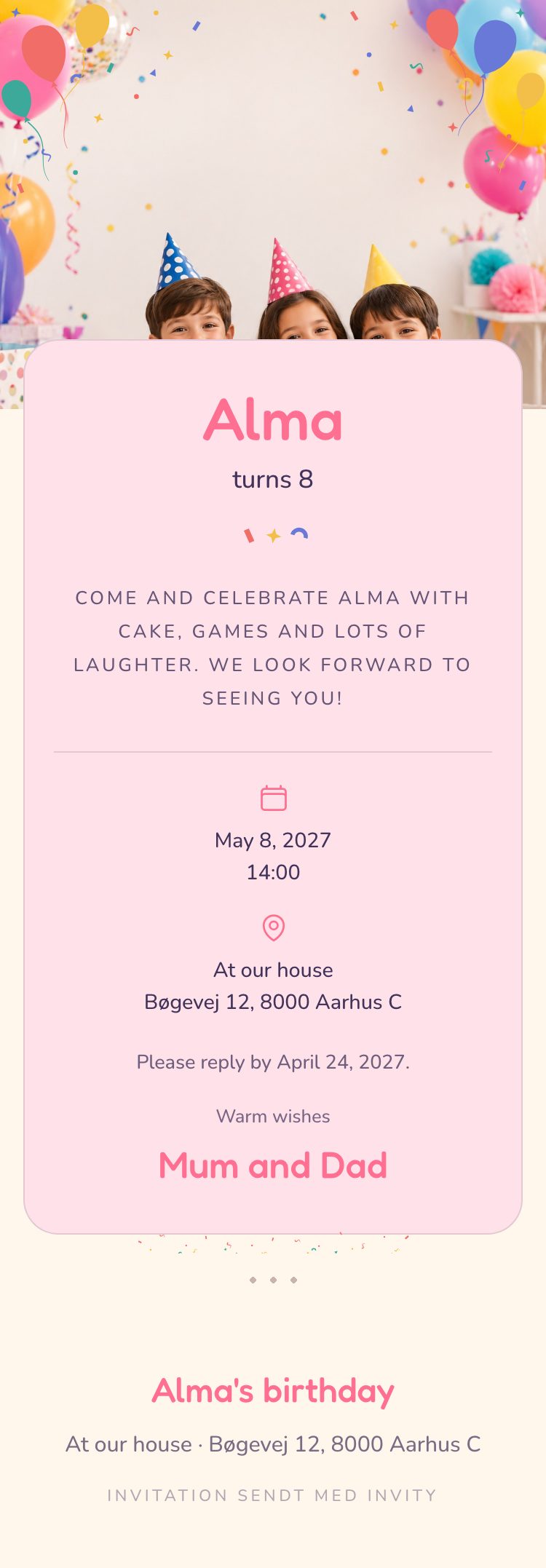
You edit the texts under Invitation. Nothing is saved until you press Save changes.
1
Title
Required
The name of the party.
Where it showsAt the bottom of the invitation and as the sender of the email your guests get. If you have not written a name under Who are we celebrating, the title also shows large at the top.
ExampleAlma's birthday
2
Date
Required
The day of the party, so your guests know when to come. If you move the date, the times under Practical move with it.
Where it showsBy the calendar, under the text.
ExampleMay 8, 2027
3
Who are we celebrating?
Optional
The name of the person the party is for. Leave it empty and the title shows at the top instead.
Where it showsLarge at the top of the invitation.
ExampleAlma
Asked for: Wedding, Birthday, Kids birthday, Confirmation, Christening, Baby shower.
4
How old?
Optional
How old the birthday person turns. Write it as a number.
Where it showsRight under the name, as "turns 8". It only shows when you have written a name too.
Example8
Asked for: Birthday, Kids birthday.
5
Invitation message
Optional
A few warm words to your guests. Write it the way you would say it.
Where it showsUnder the name or the title.
ExampleCome and celebrate Alma with cake, games and lots of laughter. We look forward to seeing you!
6
Who is inviting?
Optional
Who the invitation is from.
Where it showsAt the bottom, under "Warm wishes".
ExampleMum and Dad
Story heading
Optional
Weddings only: a heading for your story.
Where it showsIt is saved with the invitation. The current designs do not show it.
ExampleHow it all began
Your story
Optional
Weddings only: tell briefly how you met.
Where it showsIt is saved with the invitation. The current designs do not show it.
ExampleWe met in the queue for a concert in 2019 and have been laughing together ever since.
Hashtag
Optional
Weddings only: your hashtag for photos. Write it without the #.
Where it showsIt is saved with the invitation. The current designs do not show it.
ExampleAnnaAndMikkel2026